

If you want a design project to move quickly and come back looking polished, clear, and on brand, the quality of the request matters more than most people realize.
A lot of delays do not happen because the designer is slow. They happen because the project starts with missing information, unclear goals, low-quality files, or a deadline that was never explained properly. When that happens, the design team has to stop, ask questions, wait for answers, and make guesses they should not have to make.
A strong design request does not limit creativity. It gives the team the right foundation so they can make smart creative decisions faster.
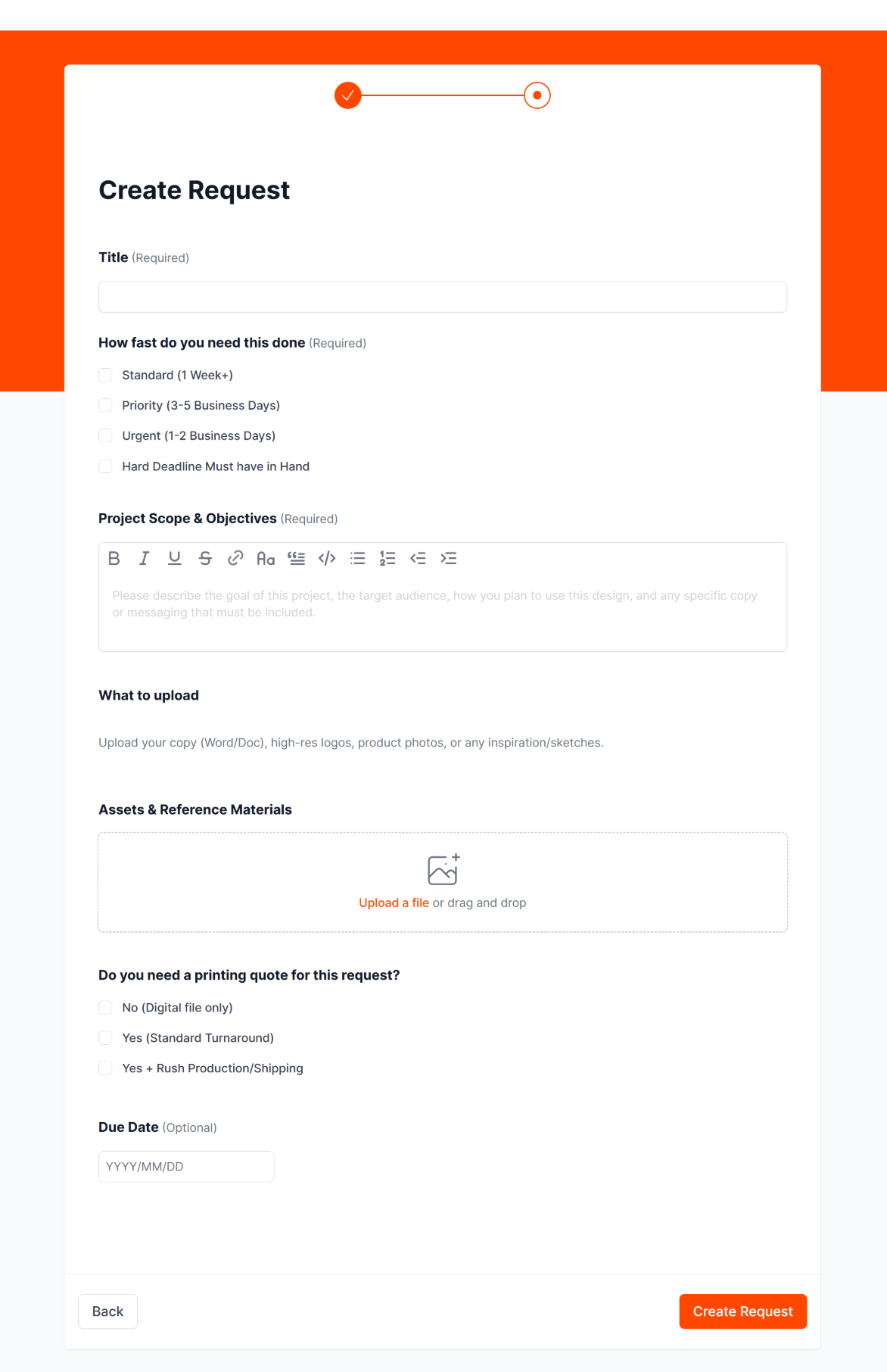
If you are filling out a request form, especially for a brochure, sales sheet, trade show piece, or other recurring marketing asset, here are five ways to set the project up well from the start.
1. Start with a title that clearly says what the project is
The title field may look simple, but it does a lot of work behind the scenes.
A vague title like “Brochure update” or “Need design help” does not give much direction. A clear title like “Update 2-Page Product Sheet for May Trade Show” instantly tells the team what kind of asset this is, what stage it may be in, and where it is likely being used.
This matters because design teams often manage multiple projects at once. A specific title helps with routing, prioritizing, file organization, and future reference. It also reduces confusion when the piece gets revised, reprinted, or reused later.
A good title should usually include:
- the asset type
- the subject or product
- the purpose or event, if relevant
The more specific the title, the less time gets wasted figuring out basic context.
2. Use the project scope field like a real brief, not a placeholder
This is the most important part of the request.
Your design team needs more than “make this look better.” They need to understand what the piece is supposed to do. That means explaining the goal of the project, who it is for, how it will be used, and what message absolutely needs to come through.
A strong project scope helps the designer make better decisions about layout, hierarchy, visuals, tone, and emphasis. Good design is not just about making something attractive. It is about helping the right person understand something quickly and take the next step.
When filling out the scope and objectives section, include:
- The goal: Is this piece meant to introduce your company, support sales conversations, explain a service, or prepare for a trade show?
- The audience: Is it for engineers, plant managers, procurement teams, general business buyers, or existing customers?
- The use case: Will this be printed, emailed as a PDF, handed out in meetings, uploaded to your website, or used at an event?
- The must-have message: What key points, claims, product details, or calls to action need to stay in the piece?
If you give this context upfront, the design team can solve the right problem the first time.
3. Be honest about timing, urgency, and the real deadline
If your request form includes options like standard, priority, urgent, or hard deadline, those choices matter.
The delivery speed affects scheduling, review windows, print planning, and what level of revision is realistic. If something truly needs to be in hand by a certain date, say that clearly. If it is for a trade show, sales meeting, shipment, or launch, mention that too.
This helps because design timing is not just about design time. It may also involve proofreading, approvals, revisions, print production, and shipping. A project with a hard in-hand deadline is different from a project that only needs digital files by Friday.
If you need print, mention it at the start, not at the end. Print adds another layer of production requirements, file setup, proofing, and timeline management. The earlier your team knows that, the better they can plan.
4. Upload the right files, especially final copy and approved assets
Many design projects slow down because the team is waiting on content or working from the wrong file types.
If you want fast results, send the cleanest and most complete materials you have at the start. That usually means:
- copy in a Word document or editable text file
- approved logos
- high-resolution product photos
- existing brochures or past versions, if this is an update
- any brand guidelines, reference materials, or inspiration
- source files, if you have them and the piece is being revised rather than built from scratch
This matters for two big reasons.
First, editable copy saves time. If your text only exists inside a PDF, screenshot, email thread, or old layout, someone has to rebuild it before design can even begin. That adds avoidable back-and-forth.
Second, file quality affects output quality. A low-resolution logo might look acceptable on screen but fall apart in print. A product image pulled from a website may not be sharp enough for a brochure or banner. Approved brand assets also help the team stay consistent without guessing.
If a project is print-related, good files matter even more. Clean inputs lead to cleaner proofs and fewer production issues.
5. Be clear about what must stay on brand and where the team has room to improve
Clients sometimes worry that giving direction will limit creativity. In reality, the opposite is usually true.
When your design team knows what brand elements must stay consistent, they can be more creative within the right boundaries. That is how you get work that feels fresh without looking off-brand.
Helpful guidance includes:
- colors or fonts that must stay consistent
- logos or marks that must be used
- design elements your team already recognizes
- examples of materials you like, and why you like them
- anything that should feel more modern, technical, premium, simple, or sales-focused
The key is to explain the reason behind your preference. Saying “we want this to feel cleaner and easier to skim for busy buyers” is much more useful than saying “make it pop.”
When the team understands both the brand guardrails and the business goal, they can create something that is more creative, more useful, and more aligned with how your company should present itself.
Common mistakes that slow projects down
Here are a few common issues that create delays or weaker results:
- Sending incomplete copy: If the messaging is still changing heavily, the layout will likely keep changing too. Final or near-final copy helps the project move much more smoothly.
- Uploading low-quality logos or screenshots: These often cannot be used for professional output, especially in print. Approved, high-resolution files help protect the final quality.
- Leaving out the audience: A design for a technical buyer should not feel the same as a piece meant for a broad sales audience. Audience context changes the whole approach.
- Not mentioning print until later: Print requirements affect setup, specs, timing, and production planning. It is much easier to build for that from the start.
- Giving only visual direction, but no business context: A piece can look polished and still fail if it does not support the actual goal. The best requests explain both what the piece should look like and what it needs to accomplish.
Final thought
A great design request does not need to be long. It just needs to be clear.
When you provide a specific title, a real objective, the right files, honest timing, and useful brand direction, you make it much easier for your design team to do strong work quickly. You also reduce revisions, avoid preventable delays, and give the project a better chance of coming back right the first time.
If you want better design results, start by giving the project a better start.
Need More Help? If you need a dependable team to handle brochures, sales sheets, updates, print files, and recurring design work, visit Brochure Design Service and explore how we help practical B2B teams get professional materials done without extra hassle.
Should I choose an urgent timeline if I am still gathering content?
Usually, no. If content, approvals, or assets are still incomplete, marking the project urgent can create pressure without actually speeding up the real bottleneck. It is better to be clear about what is ready now and what is still pending.
Why does the target audience matter so much in design?
The audience affects layout, tone, messaging hierarchy, and what should stand out first. A piece meant for technical buyers may need a different structure than one meant for general business decision-makers.
What files should I upload for a design project?
The best files to upload are editable copy documents, approved logos, high-resolution photos, previous versions of the asset, and any brand guidelines or reference materials. These help the design team move faster and avoid quality problems.
What should I include in a design request?
Include the asset type, the goal of the piece, the target audience, where it will be used, the deadline, and any required copy or brand elements. The clearer the request, the faster and stronger the design process usually is.
